Neuma White Paper:
To Branch or Not To Branch (and Merge/Test)
I don't like merging. When I merge I've got to retest. This is
especially difficult if the merging occurs a few days/weeks after the
original change. Come to think of it, I don't really like branching, but
that depends. Do I have to merge whenever I branch? Do I use branching
for a specific discipline or is it a catch-all operation which gives me
all sorts of capabilities in return for a spaghetti-like spider web of
branches and merges? And what about all the labeling that goes with it?
There must be a better way, a way to reduce branching, and merging,
while increasing automation and reducing complexity. What is it?
Branching is a tool. It's a good tool. It's just overloaded. Developers and CM Managers use branching for long term parallel development; for short term parallel development; to collect files into a change (a.k.a. labeled branch) or into a feature (a.k.a. labeled branch); to promote files to the next level, from which they are promoted to the next level, and so on; to collect files for a release or to collect an incremental release; to check in code that would otherwise have to sit on their hard drives because they don't want to break the build.
This is too much. If I've got
branches of all types, I've got merges of all types, and I've also got
labels of all types. There are baseline labels, release labels, change
and feature/fix labels, promotion level labels, and so forth. Some can
be applied multiply to the same file, some are one of, others need a
whole set of files before they can make sense.
So...
enter the branching strategy document. It helps make sense out of
labels. It helps make sense out of branching. It tells me what happens
when a new release stream is to be opened up. I can use it to implement
triggers to help support and enforce the strategy. The problem is, it
takes too long to put together and review, unless your team has been
through this a number of times already. And it's too complex, not for
developers to understand, but for developers to use their precious time
trying to read/review, understand and apply it, when there are other,
more urgent things to do. And then it the strategy changes to deal with
the unforeseen. It should all just be intuitive. But then, how would you
ever design the right configuration specification? You could borrow it
from your peer, I suppose.
Well, there is a better way. It requires understanding and modeling the process better. Don't use branches for everything.
More Branches, Less Branching?
Let's
start out by saying you can actually reduce branching and merging by
using more branches. I know that sounds contradictory. What I'm refering
to is the "main" branch strategy. Many will advocate keeping a single
main branch always. Then most development is done on the same branch,
"main." Sounds easy. I don't agree, at least in most cases. I prefer the
"step" model, where each major release development stream has its own
main branch. So instead of one "main" branch, you have a rel-1 branch, a
rel-2 branch, and so forth. Maybe you introduce a rel-1.5 branch at a
later point.
Some say, this is not really
different. Instead of starting a rel-2 branch and continuing support on
the rel-1 branch, you transition the "main" to handle "rel-2" and create
a new branch for "rel-1" support, if and when necessary. Then your
developers just continue to work on "main." But when it comes down to
it, each feature implementation or problem/issue/defect fix has to be
targeted to a given release (stream), and possibly more than one. Rather
than implementing release 1 changes on a release 1 branch, release 2
changes on a release 2 branch, and so forth, you look at the state of
"main" and decide where to make the change. So for a release 2 change,
if "main" is still tracking release 1, you need to use a release 2
branch. That branch is then merged into the "main" when it starts
tracking release 2. When "main" starts tracking release 3, you're back
to using a release 2 branch again. On top of that, there are all sorts
of timing issues - when to switch main, for example - and issues - get
your release 1 changes in so we can close down main for release 1 and
open up release 2.
Then there's the
identification issue. Is 1.33 a release 1 or a release 2 or what
revision? In the branch per release stream model, you have 1.1 to 1.N
are release 1, then 2.1 to 2.N are release 2, and perhaps 3.1 to 3.N (or
in some systems 1.1.1.1 to 1.1.1.N) are release 1.5. Not a perfect
mapping perhaps, but at least you can tell without having to consult the
branch history.
Then there's the "how do I make a
change to release 2?" issue. The answer is simple. In the "main"
strategy, it depends. In the branch per release stream strategy, you go
to the release 2 stream.
On top of all of that,
there the extra merging. Changes made to the release 2 stream before it
became mainstream have to be artificially merged to the main stream. And
what happens when I try to look at the history of such a merged file.
There are now two paths backwards to the ancestor - one through the
release 2 branch, the other through the release 1 branch. Which one is
more meaningful?
Some complain that with the step
model, your branching is getting deeper and deeper all the time. That's
just a naming convention. You're history is growing all the time,
regardless of the model you use. But your branching isn't getting
deeper. Neuma's CM+ for example, uses two-dimensional branching whereby,
although they remember the branch point for each branch, each one gets a
top level identifier so that you can always express a particular
revision using the branch id plus the relative revision number (2.12,
ab12, r2-12, etc. depending on the format you choose to use). When you
look at a file history, you have a nice 2-dimensional tree, with
branches being a first order object, and revisions underneath each
branch.
These may appear to be minor issues, but
they cascade on one another. For example, some will hold off making
release 2 changes until release 2 is the main branch, causing
unwarranted delays. Others may be prevented from checking in their
changes because of the state of flux of main, causing, perhaps, the need
for parallel checkouts and reconciles where none should have been
required. It doesn't take a lot of complexity to complicate a model -
just a few little things here and there and some people will get
confused and make mistakes, which then have to be unravelled.
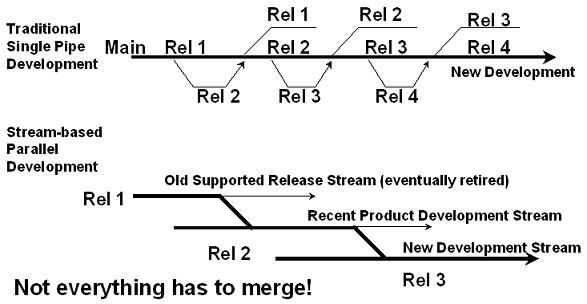
Branch
per release stream is a simple model. Simple for developers to
understand and simple for product managers to understand. And even your
CM tool can more easily understand what's going on, making it easier to
automate the CM functions. Branches don't merge. Instead, specific
changes are merged from one stream branch to another as necessary.
Eventually branches are retired.
Branch per
release stream sounds like more branching, but in fact, it's just less
merging. You need to support each of your main release streams, so you
might as well start them out on separate branches to start with. Then
there's no need to merge back into a main branch. Now this does not mean
that you branch every file into each branch. You only branch when you
need to make a change specific to the stream and there is not an
existing branch for that stream. It still pays to plan your work. Don't
start work on release 3 of the database subsystem while release 2 of the
database is still undergoing substantial change (unless, perhaps,
you're doing a major rewrite of the database). On the other hand, if you
are doing a major rewrite in release 3, you might want to start work on
it well before release 2 starts to gel. You might even want to put some
hooks into release 2 to help support the eventual transition to release
3. Because the model is simple, your CM tool just needs to know that
it's targeting the change to a specific release stream, and it can tell
you when you need to branch, and even where to branch from.
Weeding out the Branches
So,
we're going to get more branches - one per release stream. What else do
we use branching for? Well, ideally, nothing! Sounds idealistic, but is
it practical? It comes down to your tools. What do they support?
If
you want to group a set of files together, rather than creating a
branch and labeling it with your change identifier, use a change package
(a.k.a change, a.k.a. update). The change should identify the files
within it. You don't need a branch, so that you can label the branch
with the change identifier.
What about branching
for a release - so that you can label a baseline? Well, better yet, use a
tool that has baselines as a first order object, and not just an
algorithm or a label. The baseline should contain the items collected
into the baseline.
OK. Do you still need branches
for promoting changes? If your CM tool allows you to promote the actual
changes (i.e. the first order objects) and if it can draw configuration
threads through changes based on promotion level, whether for baseline
purposes or just for your context view, then you don't need promotion
branches.
There may be a number of other reasons
you branch. But if the reason is basically because there's a lack of
functionality in your CM tool, this is a big issue. Minimizing branch
complexity is important.
A Good Question
David Baird, moderator of the General CM Forum at CM Crossroads raised a good question at the ALM Expo 2005:
"How
do I handle engineer groups who want to work in isolation on a change,
want to share their work with each other, reconcile their work with
changes on the mainline, and promote their work at the end of their
isolated effort? My current solution is a task branch pattern."In the limited response time, I didn't give this question full justice. There are a number of approaches here. The first thing to notice is that it is a long, somewhat complex implementation task. It should be targeted to a future release perhaps, or if possible, planned well in advance, both because it could be disruptive, requiring multiple reconciliations on the part of the group, and because it can cause some instability, seeing that it is complex. This is how I would approach the problem.
First, I would look at the task and
break it up into logical changes (or sub-tasks). In doing so, I would
first look to see if any part of the implementation should be done in
the current development stream to help with future migration to the
new/revised feature. Then I would look at other changes for the task
that could cause instability. I would schedule those changes for the
next release which is not yet in full flight, if schedule permits. I
would also add structure so that the remaining changes could be enabled
or disabled from run-time if possible. Now all of this really doesn't
have a lot to do with branching, but it does have a lot to do with
change management - introducing change with minimal impact. And design
architecture will certainly make a difference here. So I would then look
at which pieces of the change are going to most likely hit the same
files that are going to be changing in the current stream or in parallel
in the next stream, and would try to introduce those changes rapidly,
if possible, again with run-time switches, where necessary, to hide
their impact.
OK. This might not be addressing
the CM of the problem, but it is an important part of any complex
implementation task - minimizing impact and minimizing parallel
development.
Second, if there's not likely going
to be a lot of parallel work required in the development stream for
which the change is targeted, I would perhaps just use the next
development stream's branch to implement and to reconcile current
development stream changes into. In effect, the next stream's branch
becomes the "task branch."
Third, if the above
were not feasible or easy, I would consider a parallel branch for the
effort - and initially target the new branch to a "feature" stream. This
sort of thing may not be going on all of the time, so you may be able
to use a generic feature stream; otherwise, you may need a specific
"featurexyz" stream. Use that branch to develop and reconcile, while
sharing the work with others who want to pick up your changes. After the
final feature implementation and reconciliation, I would likely merge
the final product into the target delivery stream (i.e. branch).
This
latter case, is indeed a task branch pattern, but the task branch isn't
created for every task... just for those which really need it. And
depending on the task, I very well might recommend not working in
isolation, but, having analyzed how to introduce the change into the
development/product stream, might encourage checking in safe changes
directly to the target stream branch as they're ready. Now that goes
against the premise of the question, but on the other hand, I've seen
this approach work successfully to help minimize parallel development
and subsequent retesting, while at the same time helping developers to
learn how to introduce incompatibilities and complex changes into a
product. And if fact, this works quite well if used with change
promotion states. Changes can be entered into the target stream and
promoted to a group level, for group builds, until ready for the system
build. By having an intermediate group promotion level, group-based
builders can build deliverables for use and first level testing within
the group. Other changes intermingled with the task specific changes
would be stuck at the group level until all dependent changes could be
promoted. This does not necessarily have to be when the entire task is
ready, as per the discussion above.
Minimize Parallel Changes
There's
another way to eliminate branching - minimize parallel changes. This
can be done in many ways. Intelligent scheduling and change analysis
across the project plan can help. But likely the two most helpful tools
here will be design architecture and minimizing check-out duration.
Speaking to the latter case first, if your CM tool forces you to keep
things checked out for fear of breaking the build, it is also going to
encourage parallel checkouts, and perhaps the need for parallel
branches. On the other hand, if you can check code in without it going
directly to the build, you can considerably shorten the checkout window,
eliminating the chances of parallel checkout.
Similarly,
if your process imposes arbitrary check-in freezes while a switch to a
new main is in progress, you're likely to incur more parallel change
hits, and have a resulting increase in merges. Other things which can
cause more parallel checkouts include the treatment of dependencies. If
one change is dependent on another and you have to keep both changes
checked out until they're both ready, you may be again widening the
parallel checkout window. If instead, you could check the change in
without it being pulled until you signal all the changes are in and
ready, those files are ready for checkout again and don't require
parallel checkout and merging.
Summary
I'm
not trying to get you to avoid branching, but to have a healthy respect
for branching. Branches incur complexity and overhead. If you
complicate a branching policy to handle 1% of the cases, you may be
incuring more overhead that if you just said no to branching and
modified your process accordingly.
But as well,
I'm saying that, for the most part, use branches only for parallel
development streams. If you have good tools, this model will give you
dramatic payback in simplicity. It will reduce training and confusion.
It will keep your branching sane, and easy to understand.
I
swear by this approach and rarely, if ever, create a branch which is
not a release stream branch. On small projects (<100K LOC and a few
developers), to very large projects (40M LOC and hundreds to thousands
of developers), it has worked. On top of that, I've often used it with
an Exclusive checkout only policy, encouraging rapid turnaround of
changes to files which might otherwise be under contention for parallel
checkouts. This isn't to say developers don't do parallel checkouts on
the side (i.e. without telling the system). But there is a level of
discouragement. The benefits accruing from the simplicity of such a
model, are so large that, in my opinion, they can't be ignored. Agile
development is more easily supported because developers are making
changes to the main branch (for their target releases) rather than
branching and merging and merging again for promotion.
But
it won't work without good tools and good process support. It won't
work without first order objects to replace the overloading of branches.
And there are a number of other branching scenarios I haven't even
covered (e.g. does your multiple site capability force you to branch in
order to do work at a different site?). Still, for over a quarter of a
century on some sizable projects, I could not imagine working any other
way and keeping my sanity.


No comments:
Post a Comment